Meet the New Screenfodiya PLR Software
Why Keep Paying for Screenshot Software
When Screenfondiya Can Put the Software
AND the PLR Rights in Your Hands.
Show Them Where to Click. Show Them What to Do. Then Rebrand the Tool That Does It
and SELL It as Your Own.
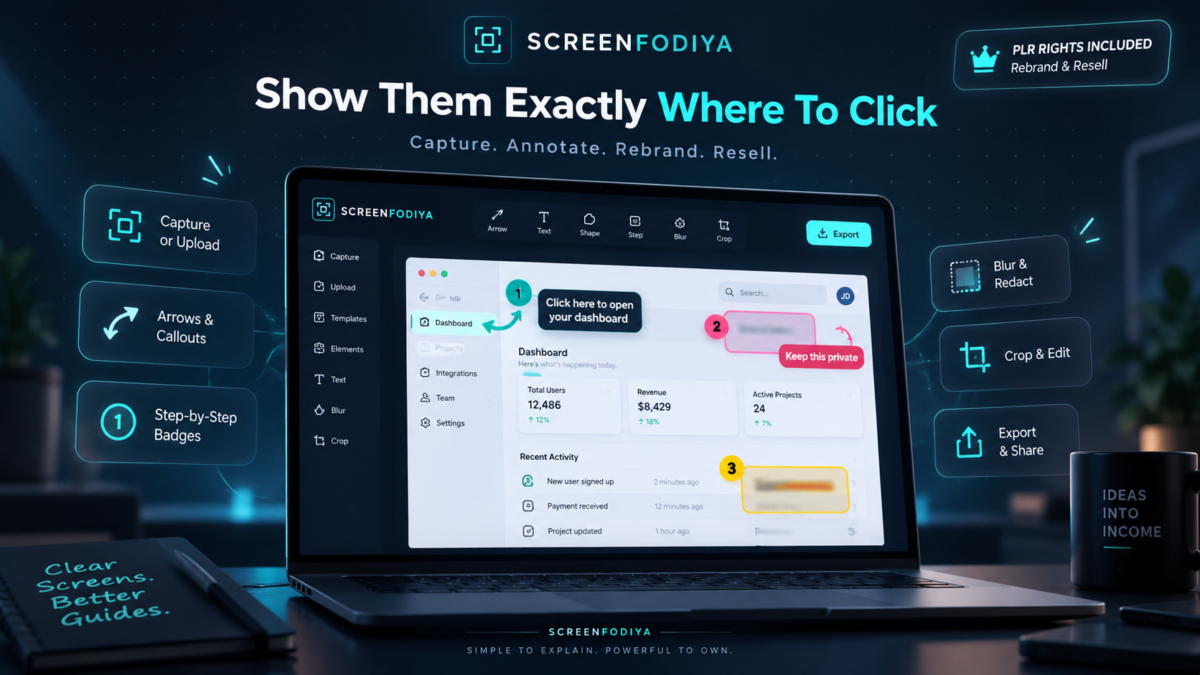
Inside Screenfodiya PLR Tool
Show people exactly where to click. Draw bold arrows with large, adjustable arrowheads. Bend them, redirect them, or use double-ended arrows to connect two important details.
Turn a screenshot into a step-by-step guide. Add numbered badges to show what comes first, next, and last with adjustable sizes, colors, and controls to renumber your steps.
Put your explanation right where it belongs. Add text directly to your screenshot, with adjustable font sizes, bold lettering, multiple lines, and optional backgrounds for easier reading.
Make important details stand out. Use colored highlights, rectangles, and ellipses to draw attention to the button, sentence, or section you want someone to notice.
Cover sensitive information before sharing. Place solid black or white redaction blocks over private details. Those blocks become part of the finished exported image.
Soften distracting areas. Apply adjustable blur to selected parts of your screenshot. For confidential information, use the separate solid-redaction tool.
Start with the image you already have. Paste a screenshot, drag and drop an image, or upload a PNG, JPG, or WEBP file.
Capture a screen, window, or browser tab. Use the built-in capture option in supported browsers, with your browser’s permission controls.
Cut away everything that doesn’t help your explanation. Crop your screenshot to focus on the relevant area and undo the crop if you change your mind.
Fine-tune your work without starting over. Move, resize, duplicate, delete, and rearrange annotations. Edit your text and reshape your arrows after placing them.
Match your markings to the message. Choose colors, line thicknesses, shape fills, and highlight opacity. Give arrows solid or dashed lines and open or filled heads.
Correct mistakes as you go. Undo and redo edits while you work, so you can try a different approach without rebuilding the entire image.
Get close enough to check the details. Zoom in, return to actual size, or fit the image to your workspace without reducing export resolution.
Export an image that’s ready to share. Download full-resolution PNG or JPG files with your annotations included without app branding, watermarks, or editing handles. Choose JPG quality to balance clarity and file size.
Copy your finished screenshot directly. Send the annotated image to your clipboard where browser permissions allow, ready to paste into another application.
Keep your screenshots on your device. Images are processed locally in your browser, with no account or screenshot upload required.
Learn inside the app. Follow the built-in animated tutorial, try a sample screenshot, and use tool-specific guidance and keyboard shortcuts as you work.
Choose a comfortable workspace. Switch between light, dark, or system-matched appearance.
Make the tool your own without editing code. Use the master edition’s rebranding controls to change the app name, accent color, and default image filename.
Create a branded customer edition. Download a standalone HTML app that keeps the editor and tutorial while removing the master rebranding controls. Your current screenshot and editing history are not included.
Sell it under your own brand. Your included PLR license lets you rebrand and resell the tool with a one-time purchase and no recurring Screenfodiya fees.
Get Instant Access to ScreenFodiya
 This Isn’t Typical PLR
This Is Your PLR Branded App
1 - Click- Rebrand it Sell it.
 This Isn’t Typical PLR
 Kindly Note: Your Access Starts Right Away : ScreenFodiya Gives You Instant Access to the Software, Private AI-Powered resources, and one-click PLR rebranding.There’s no login, no API, and no account for me to switch off later.Once the software is in your hands, I cannot take that access back.
That’s why, once delivered, all purchases are final.
Disclaimer: Please note that this product does not provide any guarantee of income or success. The results achieved by the product owner or any other individuals mentioned are not indicative of future success or earnings. This website is not affiliated with FaceBook or any of its associated entities. Once you navigate away from FaceBook, the responsibility for the content and its usage lies solely with the user. All content on this website, including but not limited to text, images, and multimedia, is protected by copyright law and the Digital Millennium Copyright Act. Unauthorized copying, duplication, modification, or theft, whether intentional or unintentional, is strictly prohibited. Violators will be prosecuted to the fullest extent of the law.
We want to clarify that JVZoo serves as the retailer for the products featured on this site. JVZoo® is a registered trademark of BBC Systems Inc., a Florida corporation located at 1809 E. Broadway Street, Suite 125, Oviedo, FL 32765, USA, and is used with permission. The role of JVZoo as a retailer does not constitute an endorsement, approval, or review of these products or any claims, statements, or opinions used in their promotion.
⚠️ Compliance Note
This system is designed to guide you toward clearer decisions, better execution, and more structured workflows.
Outcomes will vary based on individual use, effort, and application.