The Quiet Trick Beginners Are Using to Sound Smooth on Camera Without Memorizing a Single Word
Keep your script open right beside your webcam. Since only your face gets recorded, whatever's on your screen never makes it into the video, every word you wanted to say is right there the whole time you're filming.
Never blank out when it matters most.
Write your best answers once. Glance at them live, right beside your call.
|
| 1 | Open OnCue and click "Get started." That's the only decision you have to make. It takes you straight to the right place, whether it's your first time or your fiftieth. |
My Cards
Nothing saved yet. Start your first card whenever you're ready.
|
| 2 | Click "+ New card" to start one. That's all it takes to open a blank card and begin writing your own answer. |
Your cue cards
New cue card
Launch your floating panel
Opens a second, small window you can drag beside your call. It reads your saved cards, live.
|
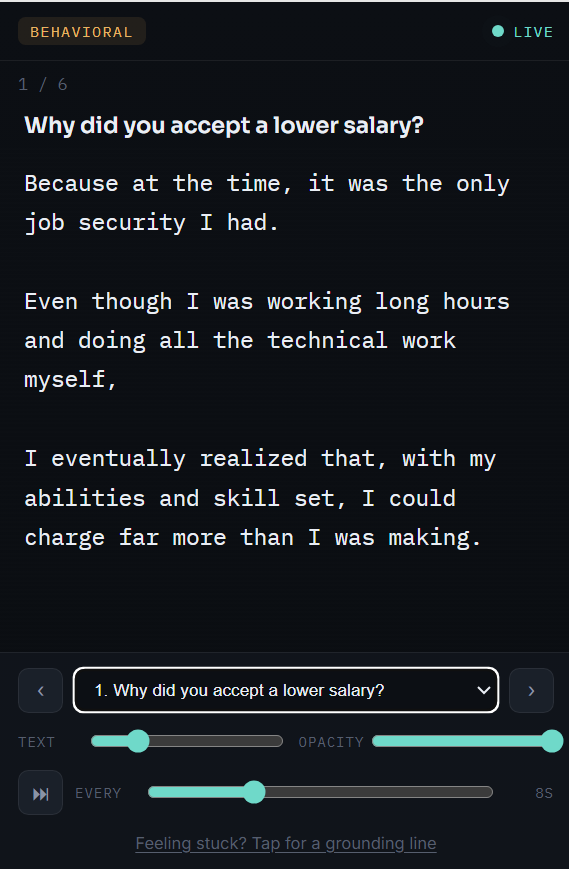
| 4 | Click "Open floating panel" and drag it beside your call. This is the part that actually stays with you while you talk. |
| BEHAVIORAL | ● LIVE |
|
‹
|
1. Why did you accept a lower salary?
|
›
|
| 5 | Move between your answers with just the arrow keys. These same buttons respond to ← and → on your keyboard, no mouse, no clicking, no breaking eye contact with your camera. |
One quiet tool. Every moment you need it most.
A private card for every question you're afraid they'll ask
Be ready the second your Zoom or Meet call starts, for the one question that's been keeping you up at night, not just the easy ones.
Ready-made scripts for the questions almost every interview asks
Skip the blank page. The questions are already loaded in for you, just make each answer yours in minutes.
A window only you can see, even while you're sharing your screen
Stay covered without changing a single thing about how you already take the call.
Move between answers without ever touching your mouse
Keep your eyes on the camera and your hands exactly where they belong.
Let it advance on its own, right on schedule, hands-free
One less thing to manage while you're focused on sounding like yourself.
One click, and a grounding line is right there if you blank
Even your worst moment already has something ready waiting for it.
Nothing you write ever leaves your browser
Prepare your most personal answers without wondering where they end up.
A two minute walkthrough that shows you every trick before your first real call
Walk into the real thing already knowing exactly how to use it.
Click once. It's yours for good.
Access The Tool opens OnCue instantly, right in your own browser. No installs, no accounts to create, no API key to set up, and no credits ticking down every time you practice. Rehearse as many times as you want, for as long as you want, on the house.
Disclaimer: Please note that this product does not provide any guarantee of income or success. The results achieved by the product owner or any other individuals mentioned are not indicative of future success or earnings. This website is not affiliated with FaceBook or any of its associated entities. Once you navigate away from FaceBook, the responsibility for the content and its usage lies solely with the user. All content on this website, including but not limited to text, images, and multimedia, is protected by copyright law and the Digital Millennium Copyright Act. Unauthorized copying, duplication, modification, or theft, whether intentional or unintentional, is strictly prohibited. Violators will be prosecuted to the fullest extent of the law.
We want to clarify that JVZoo serves as the retailer for the products featured on this site. JVZoo® is a registered trademark of BBC Systems Inc., a Florida corporation located at 1809 E. Broadway Street, Suite 125, Oviedo, FL 32765, USA, and is used with permission. The role of JVZoo as a retailer does not constitute an endorsement, approval, or review of these products or any claims, statements, or opinions used in their promotion.
⚠️ Compliance Note
This system is designed to guide you toward clearer decisions, better execution, and more structured workflows.
Outcomes will vary based on individual use, effort, and application.