Meet The Workspace That Turns Rough Ideas Into ChatGPT Instructions That Feel Like They Were Written By An Expert.
Take A 30-Second Tour Of Your New AI Workspace
Whether you're writing emails, building sales pages, planning products, improving content, or organizing scattered ideas, this simple local workspace helps you know exactly what to ask before you ever open ChatGPT.
Here's Everything Waiting Inside Your New AI Workspace.
Stop Guessing What To Ask
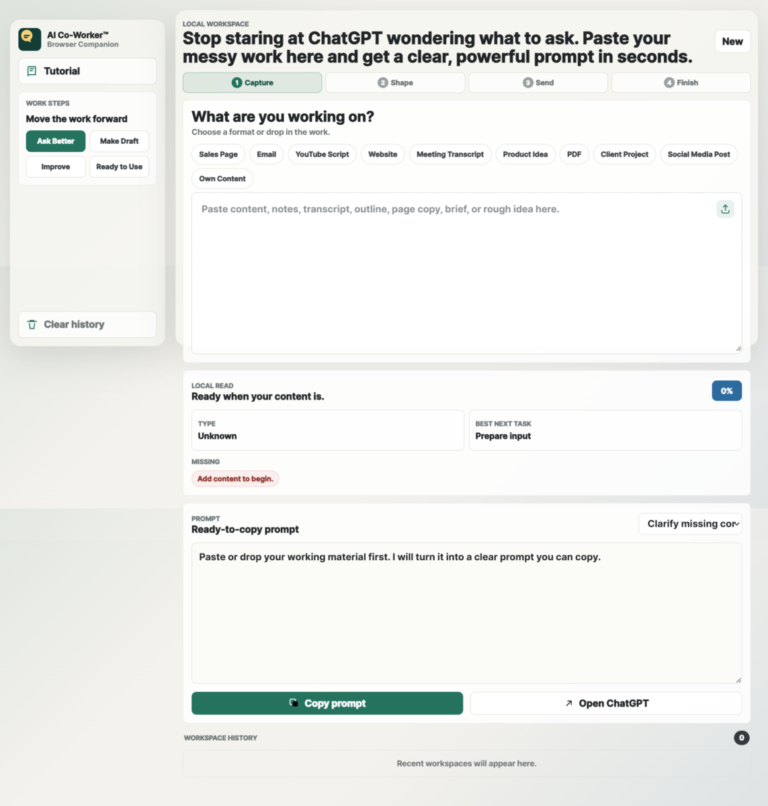
Paste your messy notes, draft, email, idea, or client brief, and the app helps turn it into a clear prompt you can give to ChatGPT.
Start With The Work, Not A Blank Box.
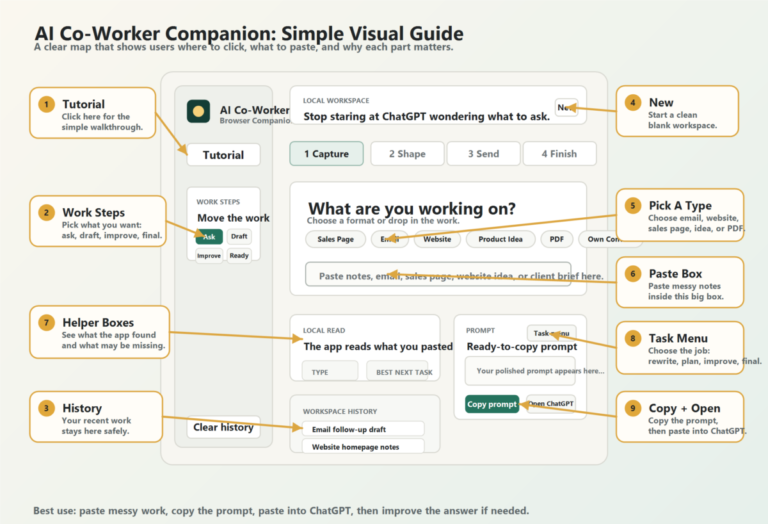
Instead of staring at an empty AI chat, you begin by choosing what you are working on: email, sales page, website, product idea, social post, transcript, PDF, or your own content.
Messy Notes Are Welcome
You do not need to organize everything first. The big paste box is built for rough ideas, half-written drafts, transcripts, notes, and unfinished thoughts.
See What’s Missing Before You Ask
The local read shows missing details like goal, audience, tone, CTA, or constraints, helping you get better answers from ChatGPT with fewer back-and-forth attempts.
Pick The Right Work Step
Use simple steps like Ask Better, Make Draft, Improve, and Ready to Use to move your work forward without needing to understand prompt engineering.
Copy A Strong Prompt In One Click
The app prepares a structured prompt for you, then you copy it with one click and paste it into ChatGPT.
Open ChatGPT Without Breaking Flow
Once your prompt is ready, click Open ChatGPT and keep moving instead of switching around, searching, or rebuilding your instructions from scratch.
Make First Drafts Less Painful
When your ideas are scattered, the app helps shape them into a prompt that can produce a cleaner first draft faster.
Improve Results Without Starting Over
If ChatGPT’s answer is not good enough, paste it back into the app, choose Improve, and create a better follow-up prompt.
Keep Recent Work Close
Workspace history saves recent items locally, so users can return to previous prompts and projects without losing their train of thought.
No Setup, No Accounts, No API Keys
The app runs in the browser with no backend, database, login, tracking, or API key required.
Private By Design
Everything happens locally in the browser. The app helps prepare your prompt, but it does not send your content anywhere by itself.
One Workspace For Many AI Tasks
Whether someone is writing emails, planning a website, improving a sales page, summarizing notes, or shaping a product idea, the same workspace guides the next step.
Access It In Seconds. Nothing To Download.
Click the “Access The App” button on your download page and the app instantly opens in your browser ready to use.
No software to install.
No downloads.
No accounts.
No setup.
No API keys.
No monthly credits. No subscriptions.
Everything runs locally in your browser, so you can start working immediately while keeping your content private. Just open the app, paste your work, and get better ChatGPT results in minutes.

Disclaimer: Please note that this product does not provide any guarantee of income or success. The results achieved by the product owner or any other individuals mentioned are not indicative of future success or earnings. This website is not affiliated with FaceBook or any of its associated entities. Once you navigate away from FaceBook, the responsibility for the content and its usage lies solely with the user. All content on this website, including but not limited to text, images, and multimedia, is protected by copyright law and the Digital Millennium Copyright Act. Unauthorized copying, duplication, modification, or theft, whether intentional or unintentional, is strictly prohibited. Violators will be prosecuted to the fullest extent of the law.
We want to clarify that JVZoo serves as the retailer for the products featured on this site. JVZoo® is a registered trademark of BBC Systems Inc., a Florida corporation located at 1809 E. Broadway Street, Suite 125, Oviedo, FL 32765, USA, and is used with permission. The role of JVZoo as a retailer does not constitute an endorsement, approval, or review of these products or any claims, statements, or opinions used in their promotion.
⚠️ Compliance Note
This system is designed to guide you toward clearer decisions, better execution, and more structured workflows.
Outcomes will vary based on individual use, effort, and application.